> For the complete documentation index, see [llms.txt](https://docs.apono.io/llms.txt). Markdown versions of documentation pages are available by appending `.md` to page URLs; this page is available as [Markdown](https://docs.apono.io/docs/architecture-and-security/apono-service-account.md).

# Apono Account Token

Learn how to create and manage service account API tokens

Apono account API tokens enable secure, account-level access to the Admin API for automations, scripts, and CI/CD integrations. Unlike personal tokens, service account tokens are not tied to an individual user and are designed for long-lived access.

Service account tokens have the following characteristics:

* **Account-Level Access**: Not associated with a specific user; permissions are defined by assigned roles
* **Role-Based Permissions**: Scoped using global [role-based access control roles](/docs/user-administration/role-based-access-control-rbac-reference.md#api-tokens) (Admin, Power User, Deployment, Viewer)
* **Editable Metadata**: Description and scoped roles can be updated after creation

***

### Prerequisites

<table><thead><tr><th width="238.375">Item</th><th>Description</th></tr></thead><tbody><tr><td><strong>Apono UI Credentials</strong></td><td>Username and password to access the Apono UI</td></tr><tr><td><strong>Admin Role</strong></td><td>Apono role with full access to all features and functionalities</td></tr></tbody></table>

***

### Create an account API token

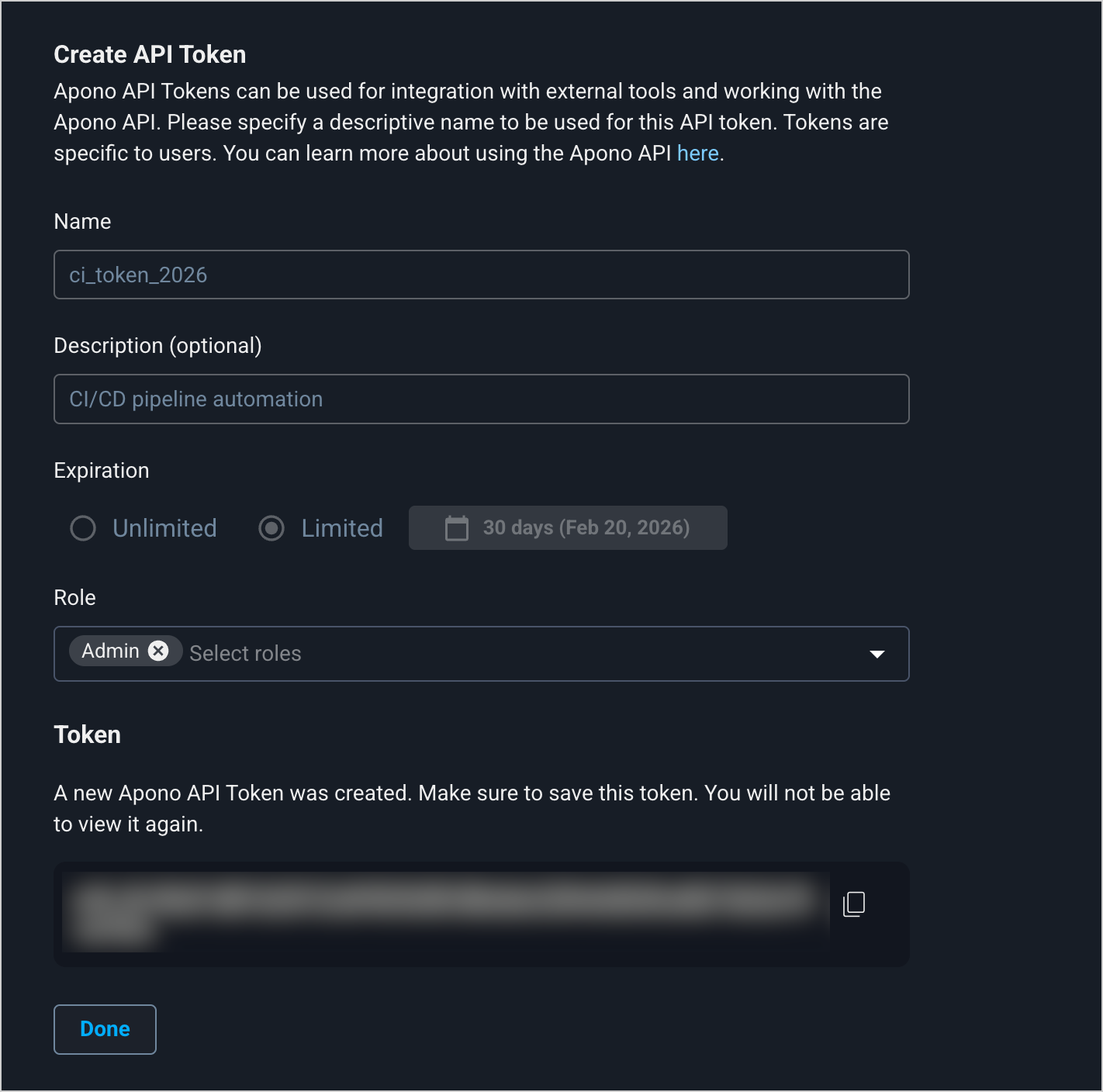
<figure><img src="https://1094436629-files.gitbook.io/~/files/v0/b/gitbook-x-prod.appspot.com/o/spaces%2Fv6MBfUGvblSdAz31yJXm%2Fuploads%2Fgit-blob-5a30271f124fd153c17e599f4a798e9f7b39e8fd%2Fservice-account-api-token-create.png?alt=media" alt="" width="563"><figcaption><p>Create API Token page</p></figcaption></figure>

Follow these steps to create a service account API token:

1. On the **API Tokens** [**Service Accounts**](https://app.apono.io/service-account) tab, click **New Service Account** or **Create Service Account**. The **Add Service Account** page opens.
2. Under **Create API Token**, enter a token **Name**. The name will identify the token on the **Service Accounts** tab.

{% hint style="info" %}
The name can only contain lowercase letters, numbers, and underscores.
{% endhint %}

3. (Optional) Add a **Description** explaining how this token will be used.
4. Choose the **Expiration** of the token.

<table><thead><tr><th width="266.12890625">Expiration</th><th>Description</th></tr></thead><tbody><tr><td><strong>Unlimited</strong></td><td>Non-expiring token</td></tr><tr><td><strong>Limited</strong></td><td><p>Time-bound token</p><p>Follow these steps:</p><ol><li>Choose <strong>Limited</strong>. The default <strong>30 days</strong> option and expiration date will appear in a blue box.</li><li>(Optional) Click the expiration to select a different duration.</li></ol></td></tr></tbody></table>

3. From the **Role** dropdown menu, select one or more global RBAC roles.
4. Click **Generate New Token**. The token appears.
5. Under **Token**, copy the token.

{% hint style="danger" %}
Be sure to copy and securely store this token in a password manager. This is the only time it will be displayed.
{% endhint %}

7. Click **Done**. The new token will appear on the **Service Accounts** tab.

After creating a service account API token, you can authenticate your queries to the Apono API. We strongly advise **against hardcoding tokens in your code**. Use environment variables or secret management.

***

### Edit a service account API token

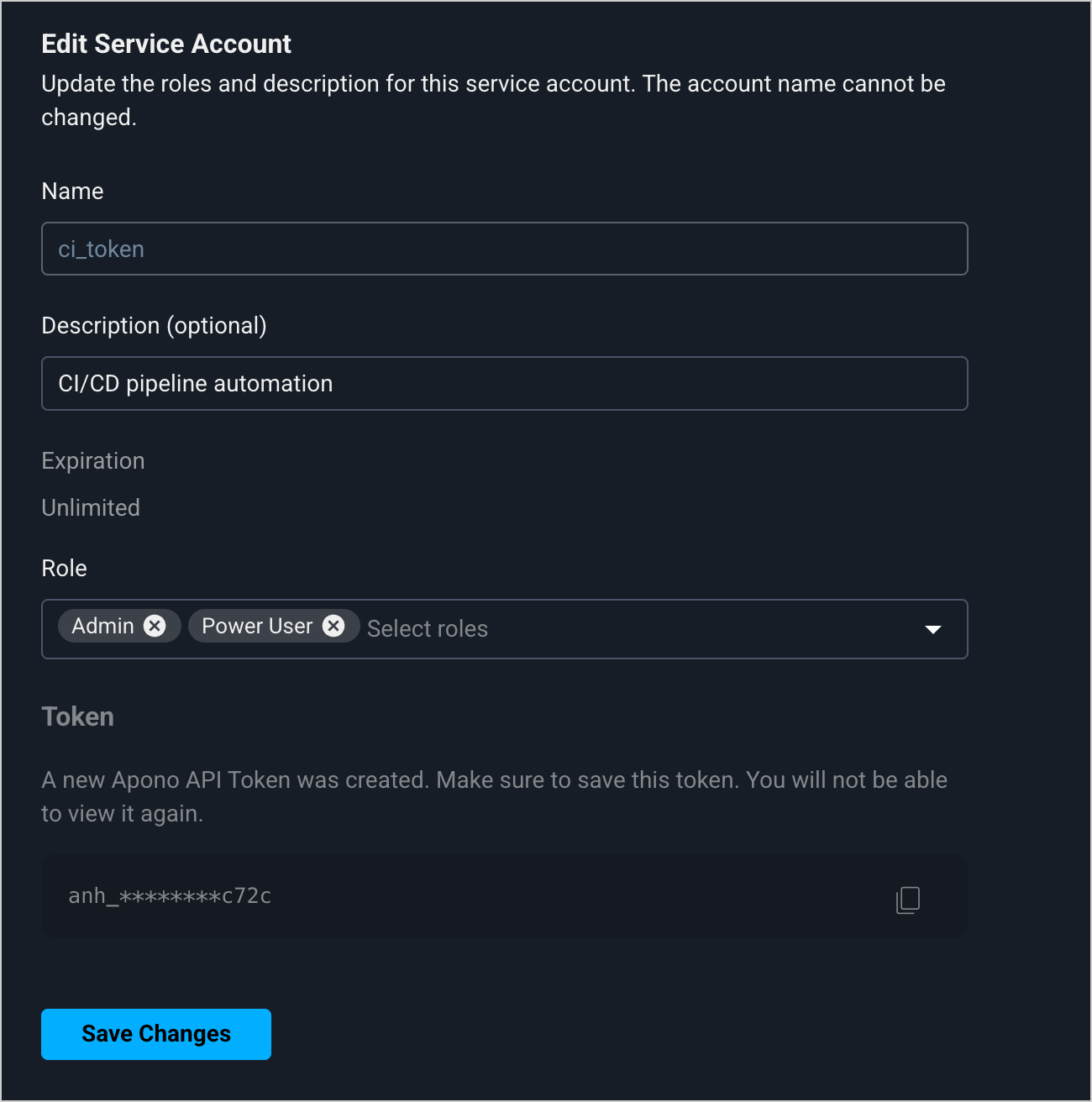
<figure><img src="https://1094436629-files.gitbook.io/~/files/v0/b/gitbook-x-prod.appspot.com/o/spaces%2Fv6MBfUGvblSdAz31yJXm%2Fuploads%2Fgit-blob-2d69c587dd21ba01c029b1350b12221605ec2d61%2Fservice-account-api-token-edit.png?alt=media" alt="" width="563"><figcaption><p>Edit Service Account page</p></figcaption></figure>

Follow these steps to edit a service account API token:

1. On the **API Tokens** [**Service Accounts**](https://app.apono.io/service-account) tab, in the row of the API token, click **︙> Edit**. The **Edit Service Account** page appears.
2. [Edit the token fields](#create-a-service-account-api-token) (steps **3, 5**).

{% hint style="info" %}
You can only the token's **Description** and **Role**.
{% endhint %}

3. Click **Save Changes**. The API token is updated and the **Service Accounts** tab appears.

***

### Delete a account token

Deleting an API token is an important security practice when the token is no longer needed.

{% hint style="danger" %}
Before deleting an API token, remove the token from any project, code base, or third-party platform to prevent service disruptions.
{% endhint %}

<figure><img src="https://1094436629-files.gitbook.io/~/files/v0/b/gitbook-x-prod.appspot.com/o/spaces%2Fv6MBfUGvblSdAz31yJXm%2Fuploads%2Fgit-blob-04b54523deff6833b18fe6ce303fed59c3163478%2Funknown%20(6).png?alt=media" alt="" width="563"><figcaption><p>Delete confirmation pop-up window</p></figcaption></figure>

Follow these steps to delete a service account API token:

1. On the **API Tokens** [**Service Accounts**](https://app.apono.io/service-account) tab, in the row of the API token, click **︙> Delete**. A delete confirmation pop-up window appears.
2. Click **Yes**. The API token is deleted and the **Service Accounts** tab appears.


---

# Agent Instructions
This documentation is published with GitBook. GitBook is the documentation platform designed so that both humans and AI agents can read, navigate, and reason over technical content effectively. Learn more at gitbook.com.

## Querying This Documentation
If you need additional information that is not directly available in this page, you can query the documentation by asking a question.

Perform an HTTP GET request on the following URL with the `ask` and `goal` query parameters:

```
GET https://docs.apono.io/docs/architecture-and-security/apono-service-account.md?ask=<question>&goal=<user_goal>
```

`ask` is the immediate question: it should be specific, self-contained, and written in natural language.
`goal` is what the user is ultimately trying to achieve, the reason they need the answer. Sharing it helps GitBook give you a better, more relevant answer. A goal is most helpful when it describes the outcome the user wants rather than restating the question. For example, with `ask=how do I create an API token`, a goal like `automate deployments from our CI pipeline` lets GitBook tailor the answer to that use case.

The response will contain a direct answer to the question and relevant excerpts and sources from the documentation.

Use this mechanism when the answer is not explicitly present in the current page, you need clarification or additional context, or you want to retrieve related documentation sections.